Open Settings > Billing. The AI briefs card sits at the bottom of the page. It shows your Available credits and, on the same line, the monthly allowance and the date of the next allowance. The information icon next to the title explains how credits are counted.

1 credit = 1 new usable prospect brief, including an update to an expired brief. Viewing an up-to-date brief again is free. A failed preparation or one with insufficient sources returns the credit. Transcriptions and post-call summaries do not use these credits.
Under the public plans, each active license provides 200 credits per month with Founder or 500 with Booster. Credits are shared by the whole team: two Founder licenses therefore provide 400 monthly credits.
The allowance renews on your subscription’s monthly anniversary, even when you pay quarterly or yearly. For example, a subscription starting on the 16th renews its credits on the 16th of each month. If that day does not exist in a month, renewal falls on the last day of that month. The first full cycle receives the full allowance; activating briefs or adding licenses during a cycle may be prorated. Unused monthly credits do not carry over. Added credits, bought or gifted by Ubic, appear under the balance: including N added.
The card adapts to your situation:
During a self-serve trial, the workspace receives 20 AI briefs once. A new month or an extension does not renew this allowance. Sales trials managed by the Ubic team remain free of commercial quotas until their end date. Plan allowances apply after the trial.
Under a contract, it shows your agreed monthly volume, with no packs to buy.
If the subscription is inactive while you still have added credits, it shows them as Paused credits.
The card does not appear before the trial starts, when briefs are unlimited for your team, or when the subscription is inactive and no added credits are still valid. Team members do not see the balance: a message in the brief tells them when no new brief can be prepared.
With an active Founder or Booster subscription, an administrator can buy a pack from the AI briefs card:
Click Add credits.
Choose a pack. Prices exclude VAT.
Click Confirm purchase.
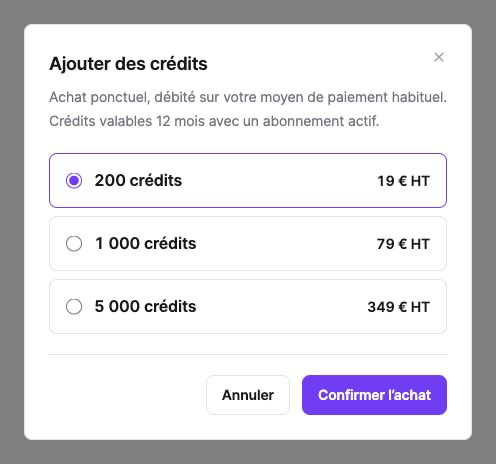
200 credits: €19 excl. VAT.
1,000 credits: €79 excl. VAT.
5,000 credits: €349 excl. VAT.
The purchase is charged to your usual payment method. Applicable taxes are added to the invoice. If a payment step is still required, click Complete payment. Once payment is confirmed, Back to billing takes you back to the card, where the credits are added to your balance.
Each pack is a one-off purchase, valid for 12 months with an active subscription, with no automatic top-up. Monthly credits are used first, followed by added credits. Packs are not available during the trial or under a contract.
Credits have run out: you can keep calling and view existing briefs. The card shows the date of the next allowance. If you are a team member, let your administrator know.
The subscription is inactive: no new briefs are prepared, but existing briefs remain available. Check your plan status under Settings > Billing. Added credits that are still valid stay paused until the subscription becomes active again; their validity period continues while they are paused.
Brief preparation is disabled for this workspace: buying credits does not enable it. Contact Ubic support to check whether briefs are available for your team.
Your purchase is still processing: use Refresh to check its status. If you have been charged without receiving credits, contact support with the invoice; do not start another purchase for the same need.