Create your workspace and verify your email. You do not need to choose a subscription during registration.
In the Try Ubic for free banner, click Start my trial.
In the activation window, choose Booster or Founder under Choose your plan.
For Booster, choose Monthly, Quarterly, or Yearly. The price per user and the amount of the first payment update as you switch.
Under Your Ubic number, choose Mobile number (a French 06 or 07 number) or Local number (a landline with a regional area code).
Click Start my free trial.
Review the summary and add your payment method in Hyperline.
Without an offer link, Booster billed yearly is suggested by default, as on getubic.com. If you arrived through an Ubic offer link, that plan is preselected. You can change it before starting the trial. Founder is billed monthly; Booster offers monthly, quarterly, or yearly billing, with quarters and years paid upfront.
The trial lasts seven days. The activation window shows when the trial ends and the amount of the first payment, and the Hyperline summary confirms them before you validate. We email you a reminder before the trial ends. Cancel the trial before that date to avoid moving to a paid plan.
An active Ubic event offer link keeps the Booster flow and its 10% discount on the first paid month. The discount appears when you activate the trial and does not apply to later months. If you cancel before the first payment and return later, it remains available once on the first month of a monthly subscription.
Founder costs €99 excl. tax per user per month. Each seat is assigned to one sales rep and includes one number, with up to three parallel calls.
Monthly credits per user:
500 calling minutes.
400 post-call transcription minutes.
200 outbound SMS segments.
During the seven-day trial, for one seat:
60 calling minutes.
30 post-call transcription minutes.
20 outbound SMS segments.
There is no attempt limit: you can keep calling while your included minutes allow it. Inbound and outbound minutes are rounded up to the next minute per billable phone call; voicemail can use minutes too. An unanswered attempt uses no minutes if the provider bills no call duration.
Each call lasts up to 30 minutes, then ends automatically. The limit may be shorter depending on your available credits, parallel calls, and the end of the billing period. During the trial, each call is limited to a maximum of 20 minutes.
Included calls go to standard French landlines and mobiles, excluding special-rate numbers. Included SMS go to standard French mobiles (+33 6 and +33 7). A long message, an emoji, or certain characters may use several segments; the segment count is shown before sending.
With Founder, transcription and the AI summary are available after the call, within the transcription allowance. With Booster, live transcription and call summaries have no monthly limit. Trial credits are separate from the credits for the first paid month.
Check My remaining Founder credits in the Ubic sidebar. For the whole team, open the Usage card under Settings > Billing. Credits belong to each user and billing period; pending reservations are deducted from the balance. Period ends shows when the current allowance ends. Changing a number or reassigning a seat does not create new credits.
Prospect briefs have a separate allowance shared by the team: the public plans include 200 credits per active license per month with Founder, 500 with Booster. An active trial includes 20 credits per workspace, once, until it ends. Transcriptions and post-call summaries do not use these credits. Settings > Billing shows your actual allowance, including terms specific to a contract or internal workspace. Read about AI credit balances and top-ups for renewals, proration, and available packs.
When Settings > Billing shows Choose your plan, you can subscribe directly:
Open Settings > Billing: the plan picker shows up right there.
Choose Booster or Founder and, for Booster, the billing frequency.
Set the number of Calling licenses. The Total excluding VAT per period updates as you go; one number is included per license.
For extra numbers, open Add numbers and fill in Extra numbers. They are billed every month on top of the licenses, and their amount is confirmed at checkout. Closing Add numbers resets them to zero.
Check the Billing email that will receive invoices.
Click Continue to payment and check the final amount, extra numbers, and taxes before confirming.
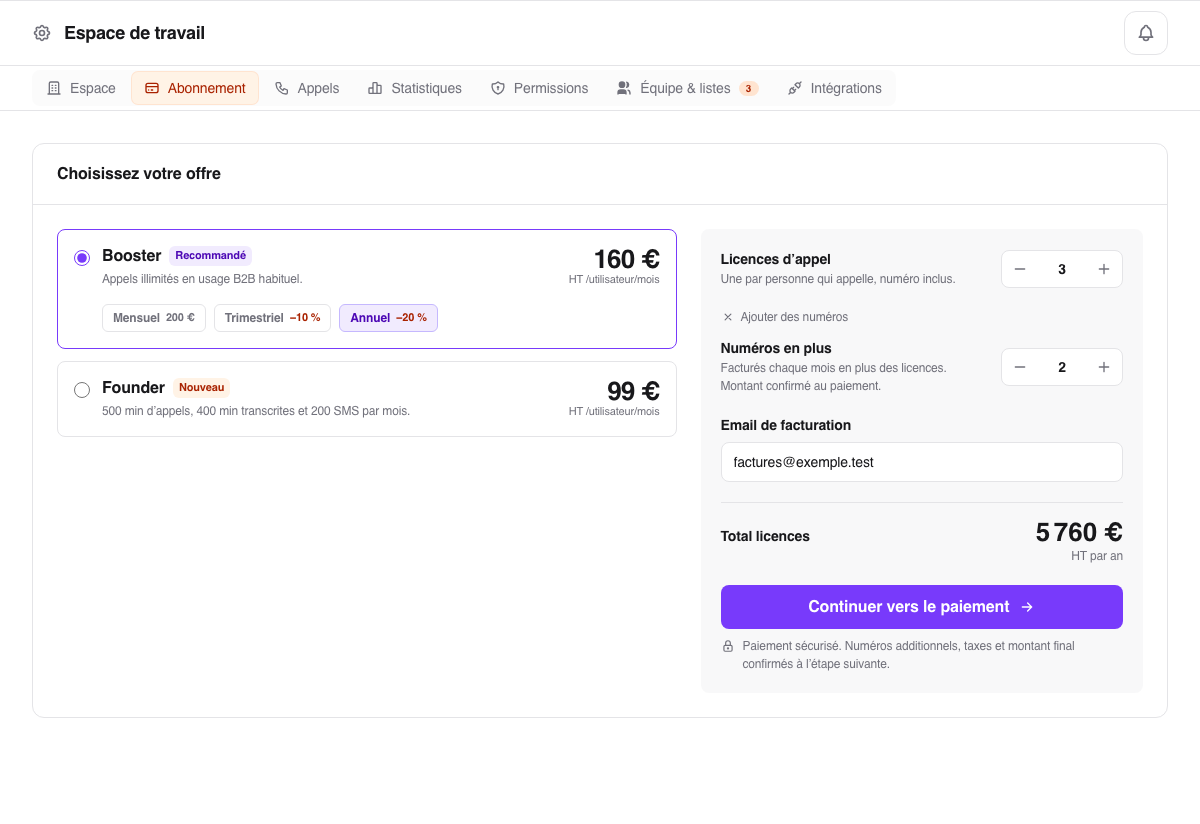
After confirmation, seats become available and numbers can be assigned to sales reps. For an active subscription, open Settings > Billing, then Manage subscription.
If Manage subscription appears instead of the plan picker after your trial, a subscription already exists: use that button to check your contract in Hyperline.
When a Founder allowance runs out, the related action is blocked: there is no automatic paid overage. Other credits remain available. For example, running out of transcription credits stops new transcriptions, but you can still call if your calling credits allow it.
Wait for the next period to receive new credits. To move voluntarily to Booster, ask Ubic support to confirm the price and effective date before accepting the change. If a balance does not match your expectations, give support the affected user, resource, and displayed Period ends date.
