Only a workspace admin can start or stop the challenge. Game must be enabled in Settings > Permissions.
The admin selects participants from verified workspace members; only those members contribute to the score.
You can track up to three goals. Available metrics are started outbound calls, completed outbound calls, and conversions configured in the workspace.
Power Hour lasts exactly one hour. Its progress is live in Game, and the compact indicator remains visible in the Dialer.
Open Game from the sidebar, then Right now.
Click Start a challenge and select Power Hour.
Choose the goals and enter a target for each one.
Search for and select the participants.
Click Start the Power Hour.
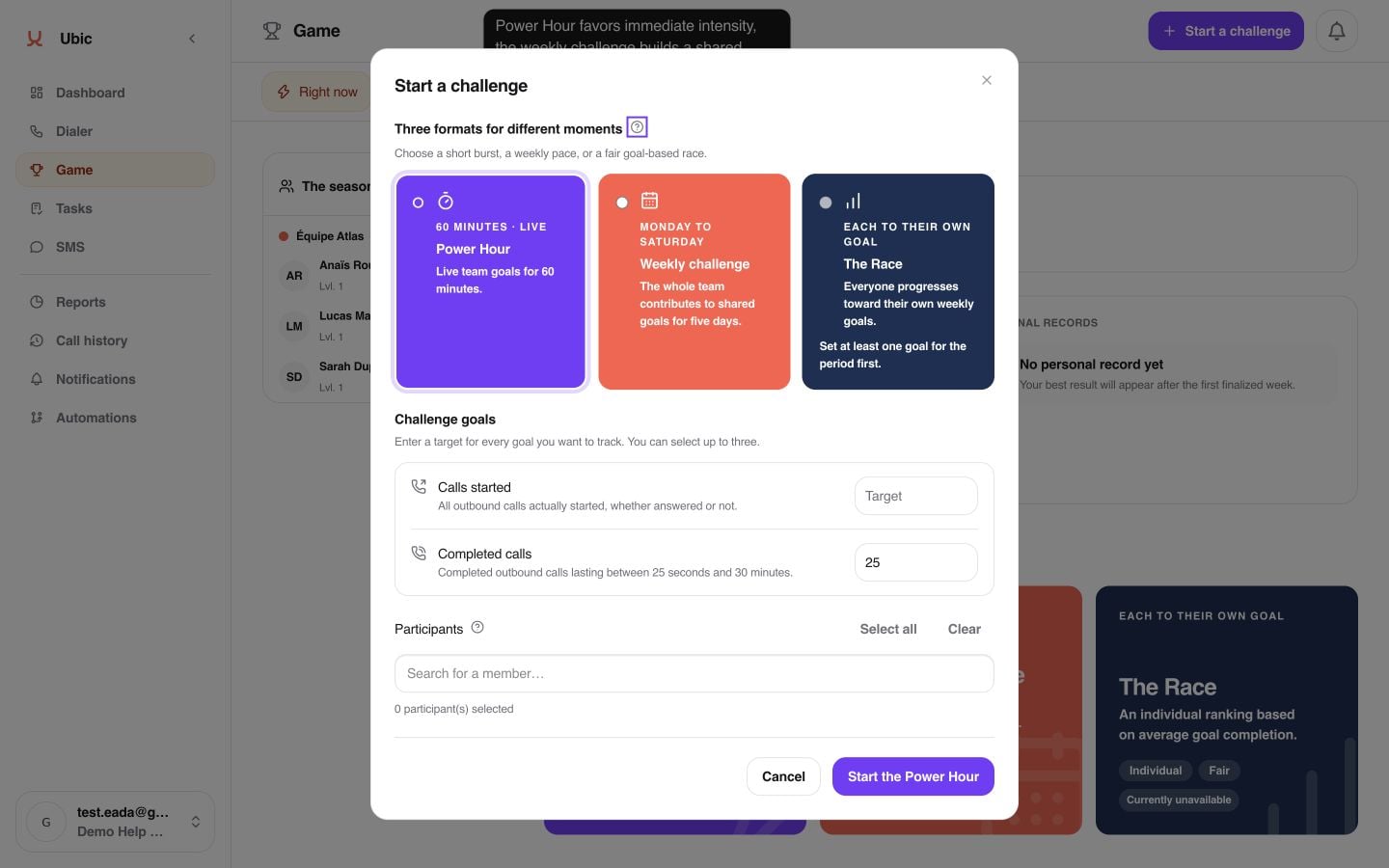
During the challenge, each participant sees team progress and their own contribution. For the Completed calls goal, a call must be outbound, completed, and last from 25 seconds to 30 minutes. If an admin stops it, the challenge is cancelled.
If Game is missing, ask an admin to check that it is enabled in Settings > Permissions. If Power Hour is marked unavailable, use another format or try again later. Only one Power Hour can run in a workspace: wait for it to finish or ask an admin to stop it.
